Start and choose a provider
powershellmtp tui
mtp tui --backend groq
mtp tui --backend ollama --cwd C:/projects/my-project
Provider setup, model selection, and commands work before any chat is sent. Selecting a provider does not construct an agent or generate a reply.
- Run
/backendor choose Choose Provider in Ctrl+P. - Select a provider with arrows and Enter, or click it. Rows show whether a key or endpoint is configured.
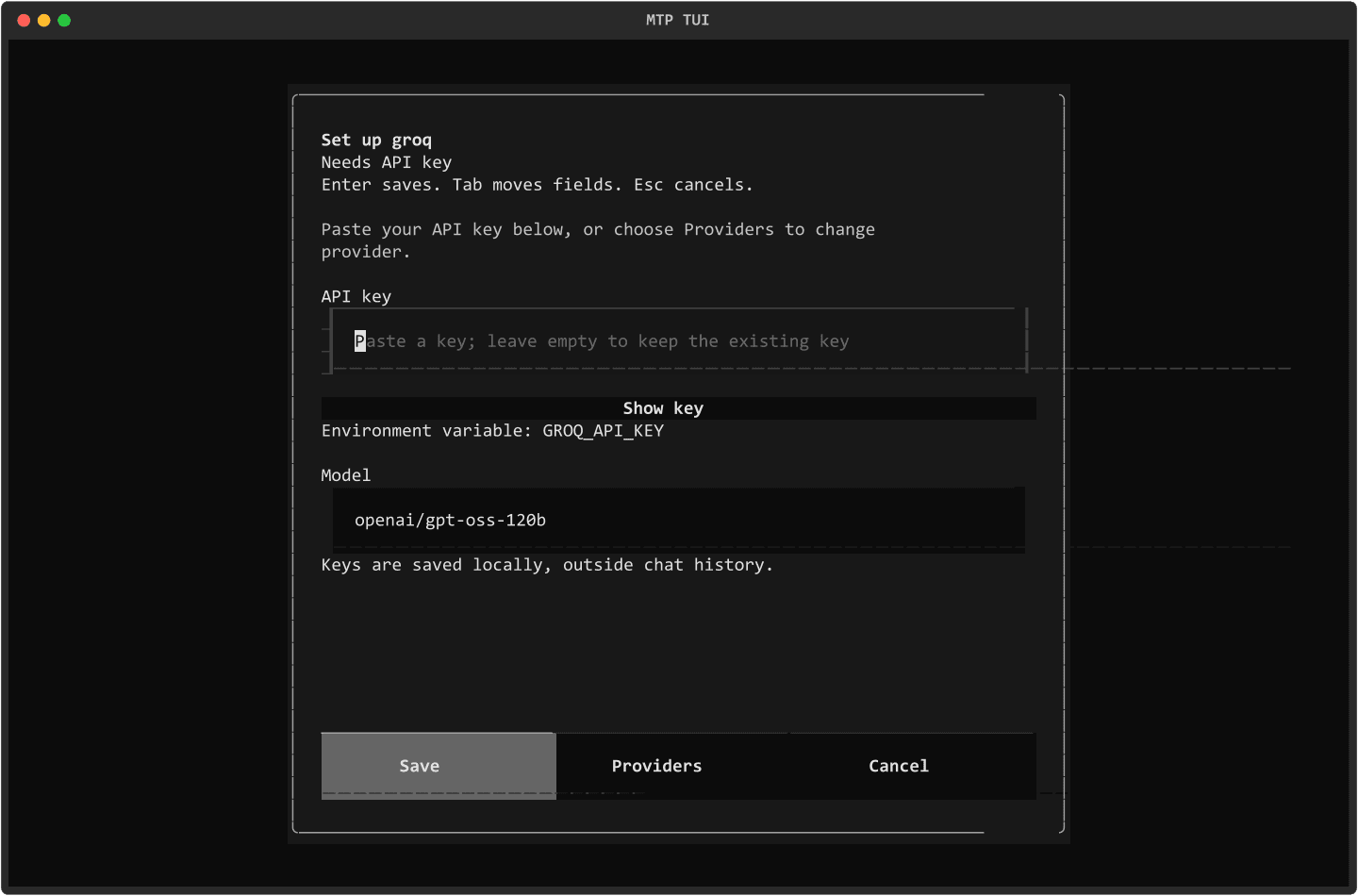
- If a cloud provider needs a key, paste it into the masked field. Keep the suggested model or type a full model ID. Press Enter or Save & use.
- Choose Providers to select another provider, or Escape/Cancel to leave without saving. A failed save keeps the form open for retry.
- The model picker then fetches model metadata. Choose an ID or enter a custom/private ID.
API-key management
/apikey opens setup for the current provider. With Codex selected, it opens the provider list because Codex uses CLI login instead of a provider API key. /apikey groq opens Groq's form directly.
Save in key management updates credentials without changing the active provider. Save & use during backend selection saves and selects the provider. Existing keys are not prefilled. Leaving the field empty keeps the saved or environment key. Show key reveals only the key currently being entered.
| Command | Behavior |
|---|---|
/apikey | Open setup or the provider list for Codex |
/apikey <provider> | Open masked key and model setup |
/apikey list | Show credential status without key content |
/apikey show <provider> | Show a masked key |
/apikey delete <provider> | Confirm removal of a saved key |
/apikey set <provider> | Open the key-entry form |
The old /apikey set <provider> <key> form still works, and its input-history entry is redacted. Prefer the masked form so the key is not typed into the composer.
Saved keys take priority over environment variables. Examples include GROQ_API_KEY, OPENAI_API_KEY, ANTHROPIC_API_KEY, and MIMO_API_KEY. TUI startup loads .env from its working directory when python-dotenv is available. .env.example remains a template and is never loaded as credentials. Removing a saved key does not remove an environment variable.
Settings are local JSON in tui_provider_settings.json beside the session database. With the default --session-db, the path is ~/.mtp/sessions/tui_provider_settings.json. The file is not encrypted and is separate from chat transcripts. Use an environment variable if you do not want to save a key locally.
powershellmtp doctor --provider groq
mtp doctor --provider groq --session-db C:/path/to/custom-sessions
Doctor checks the same settings directory without printing keys. A saved key means setup is present, not that the provider has validated it.
An unconfigured provider opens setup on startup. Submitting a message without configuration restores the draft and opens setup instead of starting a failed chat. Saving does not automatically send that draft.
Local inference
Choose ollama or lmstudio with /backend. Their forms ask for an endpoint and model ID. A local server normally needs no key.
- Ollama defaults to
http://localhost:11434. - LM Studio defaults to
http://localhost:1234/v1.
Start the server separately. Load models from server fetches metadata and offers a picker. Select a model, then Save & use. Discovery sends no chat request. Invalid URLs, connection failures, and empty catalogs show messages without closing the form. Manual model entry remains available.
Current and custom models
/model opens a searchable picker for an MTP provider. It loads the model-list API on a worker. Search, press Enter to focus matching results, then use arrows and Enter to select. Tab reaches the custom-ID field and buttons. Escape cancels.
| Command | Behavior |
|---|---|
/models | Show the cached list and source |
/models refresh | Open and refresh the MTP picker, or refresh Codex's catalog |
/model | Open model selection |
/model <full-id> | Select an ID, including a custom/private model |
/model add <provider> <full-id> | Add a manual ID without changing the active model |
text/backend groq
/model openai/gpt-oss-120b
/model add groq private/my-model
/model private/my-model
Fetched catalogs and manual IDs are stored separately. Refresh replaces the API snapshot while preserving custom entries. It does not reinsert hardcoded defaults omitted by the provider. Failed requests preserve the cache. Missing keys, access errors, rate limits, malformed responses, and unavailable endpoints leave manual entry available.
Model-list access does not guarantee inference permission or tool compatibility. A manually entered ID can override the catalog, which is useful for private or enterprise models. Fireworks discovery lists its public fireworks publisher account; private IDs can be entered manually. Local-provider discovery uses the configured endpoint.
Groq's offline default is openai/gpt-oss-120b. Offline suggestions also include openai/gpt-oss-20b and qwen/qwen3.8-27b. Groq retired llama-3.3-70b-versatile and llama-3.1-8b-instant for free and developer tiers on August 16, 2026. Existing selections are preserved, but an unconfirmed retired selection opens the model picker before a run. Enterprise users can explicitly enter their model ID. See Groq deprecations and supported models.
Other providers' defaults are offline suggestions, not authoritative current catalogs. If discovery is unavailable for a provider/account, enter its full model ID manually.
Codex uses the installed CLI's model catalog. /codex models refreshes it. Use /model 1, /model 2, or a full model name. Discovery failures retain a labelled cache or fallback.
Thinking
Use /thinking to open supported controls, or /thinking <value> to apply a value. The palette and status badge open the same picker.
- Codex options follow the installed CLI's catalog for the selected model.
- Groq GPT-OSS 20B and 120B support
low,medium, andhigh. - Groq Qwen 3.8 27B also supports
noneanddefault. - Supported Xiaomi MiMo models support
onandoff. - Other models show a message when the TUI has no supported control.
Unsupported values are rejected. /reasoning remains a compatibility alias, hidden from help, autocomplete, and the palette. Launch with --thinking high; --reasoning-effort is an alias for the same option. Groq levels follow its reasoning documentation.
Read commands without clipping
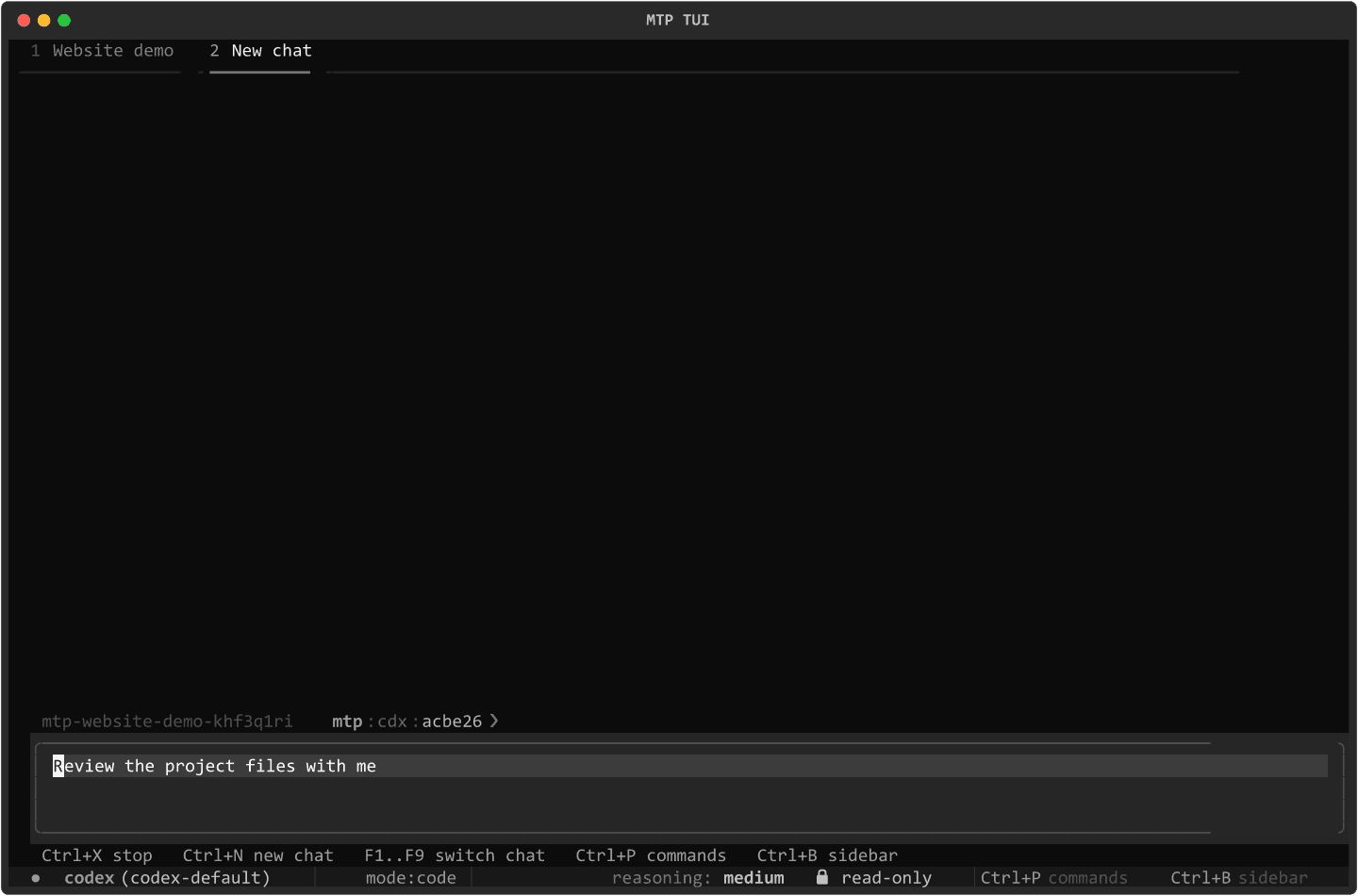
Commands dismiss the centered home banner and fill the available area above the composer. Output reflows when the terminal is resized or the sidebar changes width. Long results scroll instead of extending beneath the input.
- Ctrl+O focuses output; PageUp/PageDown scroll it. The mouse wheel also works.
- Escape dismisses a picker or command output and returns to the composer.
- Ctrl+L and
/clearclear the display consistently without deleting saved sessions. /helpshows commands without putting a slash into the draft.
The sidebar needs at least 80 columns. At smaller widths, use /status; the input remains accessible.
Chats and editing
| Key or command | Action |
|---|---|
Ctrl+N or /new [label] | Open a separate chat |
| F1–F9 | Select chat positions 1–9 |
| Alt+Left/Right or Ctrl+PageUp/PageDown | Previous/next chat |
/switch <n> | Select an open chat by position |
/tabs or /chats | Show positions and state |
/close [n] | Close a chat; stop a running chat first |
| Enter | Submit a message, execute a command, or select a suggestion |
| Shift+Enter | Insert a newline |
| Ctrl+P | Command palette |
| Ctrl+B | Sidebar |
Ctrl+D or /exit | Exit |
Ctrl+Shift+S or /sandbox | Choose sandbox permissions |
| Ctrl+Y | Copy the last reply |
Alt+number remains a compatibility binding, but Windows terminal hosts may consume it or lose the modifier. Use F1–F9, the arrow shortcuts, or /switch. These select MTP chats rather than terminal-application tabs.
Draft text, cursor position, attachments, and input history belong to each chat. Switching restores that chat's draft. Ctrl+W deletes the previous word; it no longer changes sandbox permissions. Ctrl+C remains copy, and Ctrl+X cuts when no reply runs.
Type @ to search files and choose one with Enter or Tab. Clicking an attachment badge or pressing Backspace on empty input removes it. Commands keep attachments pending. Paths containing spaces use quoted references internally.
Configuration and sessions
| Command | Action |
|---|---|
/status | Show session settings and provider setup state |
/sessions or /load | Saved-session picker |
/load <id> | Load a saved session in its own chat |
/open <id> | View a saved transcript |
/history [n] | All or the latest n turns |
/tools | Last-turn tool events |
/details [toggle|on|off] | Tool-detail display |
/mode [plan|code|debug|review] | Harness mode |
/sandbox [read-only|workspace-write|danger-full-access] | Permissions |
/rounds <1-1000> | Provider round limit |
/cd <directory> | Workspace; relative paths use this chat's directory |
/autoresearch <on|off> | Auto research |
/research [text] | Set or clear instructions |
/codebase memory | Choose on, off, or show |
/codebase status | Local index state |
Quoted /cd paths work. Invalid numeric arguments, sandbox names, and unclosed /codex quotes report errors without ending the app. Sessions persist in --session-db. Corrupt provider settings are backed up as tui_provider_settings.json.corrupt-<timestamp> before recovery, with a visible notice.
Running replies
Switching chats does not stop background replies. Changing backend, model, workspace, or mode applies to the next run; the current run keeps its captured settings.
Enter queues input while a reply runs. /queue lists messages and /queue clear drops them. For an MTP backend that supports steering, Ctrl+G or /steer <text> sends new input into the running reply. Codex replies can only queue. Ctrl+X stops the active reply. Escape closes suggestions or command output first, then can stop a reply.
Partial output from stopped or failed replies is saved with its status. Tool events and token metrics appear when the backend reports them; unavailable usage is not shown as zero.
Codex login and launch options
/codex login, /codex logout, /codex status, /codex account, /codex models, /codex doctor, and /codex repair-config use the installed Codex CLI or its metadata interface. API-key forms do not manage Codex credentials.
mtp tui --help lists options. Common ones include --backend, --cwd, --session-db, --session-id, --codex-model, --openai-model, --thinking, --mode, --max-rounds, --autoresearch, and --research-instructions. --openai-model overrides the saved OpenAI model; otherwise the saved model is preserved.
The audit and follow-up describe testing and its limits. Live inference and real account access require separate verification with working credentials.